Search This Blog

Lets go..


Manage your Inventory | Grow your restaurant business | Manage your Employee | Control your accounts

Wednesday

Securing soap web service with Spring-WS using Wss4jSecurityInterceptor (Part-3 Client Part)

Sorry for late.
Description add later. Just follow this document.
http://docs.spring.io/spring-ws/site/reference/html/security.html 
I have just followed this article and writing code according to the instruction.
Complete source code download from bellow link:
https://www.dropbox.com/s/7bm6rgsmnozswyj/SecureSpringClient.zip?dl=0

If you will face any problem to run this code, feel free to  mail.
Please note that you must delete build folder from project and clean and build using Netbeans IDE again.

Thanks
Md Mahfuj Jia
Happy Coding...


Securing soap web service with Spring-WS using Wss4jSecurityInterceptor (Part-2 Server Part)

Sorry for late.
Description add later. Just follow this document.
http://docs.spring.io/spring-ws/site/reference/html/security.html 
I have just followed this article and writing code according to the instruction.
Complete source code download from bellow link:
https://www.dropbox.com/s/8pxx7mh8ljtpjkk/SecureSpringWS.zip?dl=0

If you will face any problem to run this code, feel free to  mail.

Thanks
Md Mahfuj Jia
Happy Coding...


Saturday

Securing soap web service with Spring-WS using Wss4jSecurityInterceptor (Part-1)

Author: Md Mahfuj Jia

Create Client/Server Keystores using Java Keytool

Run the following commands::

keytool -genkey -alias server -keyalg RSA -keystore server.jks
keytool -genkey -alias client -keyalg RSA -keystore client.jks
keytool -list -v -keystore server.jks -storepass server_public_keypass
keytool -export -file server.cert -keystore server.jks -storepass server_public_keypass -alias server
keytool -export -file client.cert -keystore client.jks -storepass client_public_keypass -alias client
keytool -import -file client.cert -keystore server.jks -storepass server_public_keypass -alias client
keytool -import -file server.cert -keystore client.jks -storepass client_public_keypass -alias server

Java keytool stores the keys and certificates in a keystore, protected by a keystore password. Further, it protects private key again with another password. A Java keystore contains private-public key pair and multiple trusted certificate entries. All entries in a keystore are referred by aliases. Both private key and self signed public key is referred by one alias while any other trusted certificates are referred by different individual aliases.

This is the first part of this tutorial. In second part we discuss about Spring web service server side security configuration and in 3rd part we make a secure client using spring web service client to consume this secure service.

These are some screen shots::


Thursday

Difference Between Web Service and API

By: Mohammad  Tuaha


A Web service is merely (নিছক) an API wrapped in HTTP. An API doesn’t always need to be web based.
 An API consists of a complete set of rules and specifications for a software program to follow in order to facilitate interaction. A Web service might not contain a complete set of specifications and sometimes might not be able to perform all the tasks that may be possible from a complete API.


API and Web service serve as a means of communication. The only difference is that a Web service facilitates interaction between two machines over a network.
An API acts as an interface between two different applications so that they can communicate with each other.
All Web services are APIs but all APIs are not Web services.

Web service
API
A Web service always needs a network for its operation.

An API doesn't need a network for its operation.

Web services might not perform all the operations.


API would perform all the operations.

A Web service uses only three styles of use: SOAP, REST and XML-RPC for communication.
API may use any style for communication.
A Web service is designed to have an interface that is depicted (ফোটানো) in a machine- process able format usually specified in Web Service Description Language (WSDL). Typically, “HTTP” is the most commonly used protocol for communication.
An API is a method by which the third-party vendors can write programs that interface easily with other programs.
In case of Web applications, the API used is web based. Desktop applications such as spreadsheets and word documents use VBA and COM-based APIs which don’t involve Web service. A server application such as Joomla may use a PHP-based API present within the server which doesn’t require Web service.
A web service typically offers a WSDL from which you can create client stubs automatically.
Web API can also be used to create OData services.
·         Web Services are based on the SOAP Protocol.

  
      Web services are based on standard defined by W3C.
·         Web API can be used to create any type of web service, most commonly RESTful services.
·         Web API can present the data in nearly any format not just JSON, or XML. (Csv, protobuf, streams etc.)
·         Web API is hosted in an OWIN framework.
·         Web API is easy to extend.


Enjoy Free code


Generate soap client from wsdl in Netbeans


By: Md Mahfuj Jia

Introduction: In previous tutorial we have seen, how to create soap web service using SpringWS and Apache CXF. After creating web service we need to consume and make a client for these web services. Your business layer is completely separate from client and main purpose of the client is creating request and get response.  For java, Netbeans is a fantastic tool for creating client from wsdl and in this tutorial we will see how to create client from wsdl and how to consume it.

Projects snapshots:

Image: 1 –This is our wsdl from previous tutorial and we will generate client from this wsdl.

Image: 2-3  -Steps of generating wsdl client.

Image: 4 –Output after generating client.

Image: 5 –Now we see the generated file in Netbeans.

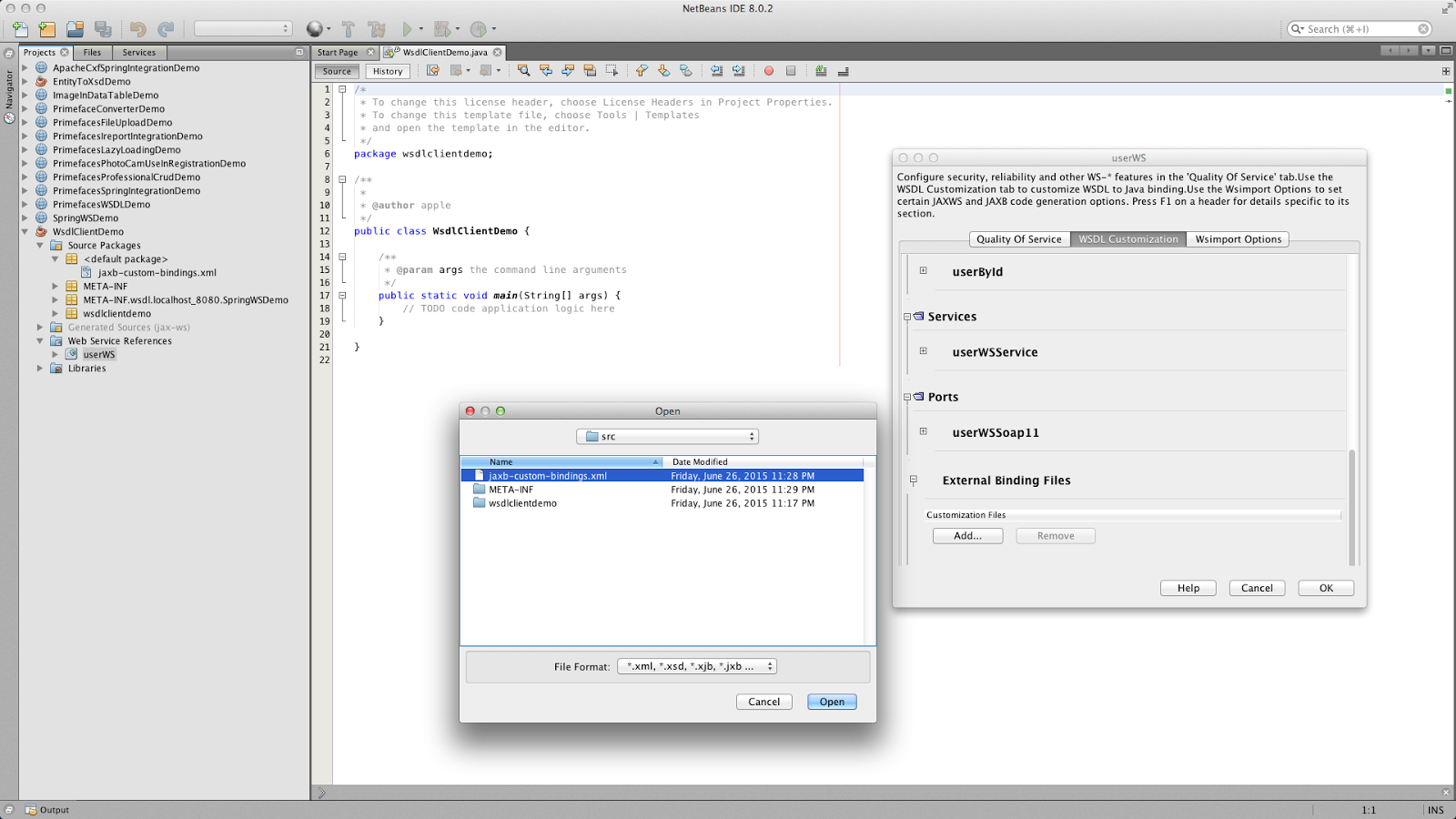
Image: 6-8 –When client will generate, we see the generated source code contains xmlgorgioncalender date format and we need to convert this date format to java.util.date. For conversion, we need external binding file, which makes our client code serializable and convert the desire date format.

Image: 9 –To avoid this error, just clean and build the project in Netbeans.

Image: 10 –This is our main class. Here we will see how to consume service using wsdl client.


Project Source Code:

Happy coding…